Currently I'm working on a .Net 4.0 WPF app and we've had some discussion about moving to .Net 4.5, we don't get to make the decision :( but we're interested to know what performance gain we'd get.
What follows is a comparison of the same app compiled against .Net 4.0 & 4.5. The app makes use of a couple of NuGet packages - Autofac & Reactive Extensions, both of which provide versions for both .Net 4.0 & 4.5. It also makes use of Telerik grid control to render the data.
What does the app do?
Pretty simple, it generates a 1000 rows of data asynchronously and binds this to a telerik grid, for every iteration the grid is clear of any data first.
 How am I going to measure any performance improvement?
I'm using the code from a previous post - 'Measuring UI Freeze...', I'm expecting any improvement to be visible in a reduced amount of time on the dispatcher thread - if the (.Net) code base is more efficient it should surely reduce the amount of time required to render the UI.
I'm going to repeat the generation and rendering of data 100 times for each version of the framework, this should allow an statistical anomalies to be ignored.
How am I going to record any improvement?
Simply write out to file any value that exceeds 1000 milliseconds, this is done in the App_Startup method:
 So what's the outcome?
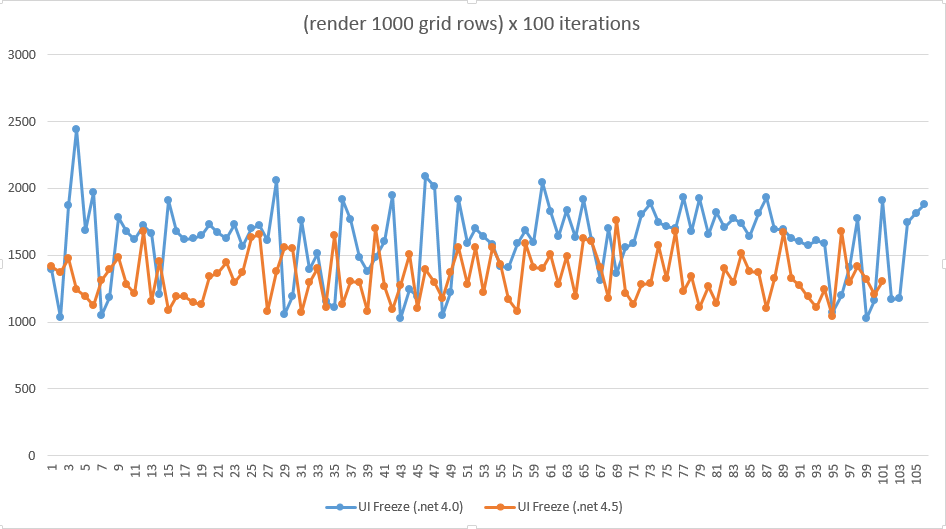
The outcome is best visualised as a set of graphs, first a scatter graph where x-axis represents the iteration and y-axis represents the UI freeze duration in milliseconds:
 and more impressively a bell curve,where the x-axis represents the duration in milliseconds of any UI freeze and frequency on the y-axis:
 Averages are as follows:
.Net 4.0 average = 1605 ms
.Net 4.5 average = 1337 ms (elite :))
Or to put it another way this is a 16% increase in performance!
Okay so this wasn't anywhere near a scientific approach but it did show over 100 iterations there is measurable improvement, I've made the code available for the .Net 4.5 version.
What follows is a comparison of the same app compiled against .Net 4.0 & 4.5. The app makes use of a couple of NuGet packages - Autofac & Reactive Extensions, both of which provide versions for both .Net 4.0 & 4.5. It also makes use of Telerik grid control to render the data.
What does the app do?
Pretty simple, it generates a 1000 rows of data asynchronously and binds this to a telerik grid, for every iteration the grid is clear of any data first.
I'm using the code from a previous post - 'Measuring UI Freeze...', I'm expecting any improvement to be visible in a reduced amount of time on the dispatcher thread - if the (.Net) code base is more efficient it should surely reduce the amount of time required to render the UI.
I'm going to repeat the generation and rendering of data 100 times for each version of the framework, this should allow an statistical anomalies to be ignored.
How am I going to record any improvement?
Simply write out to file any value that exceeds 1000 milliseconds, this is done in the App_Startup method:
The outcome is best visualised as a set of graphs, first a scatter graph where x-axis represents the iteration and y-axis represents the UI freeze duration in milliseconds:
.Net 4.0 average = 1605 ms
.Net 4.5 average = 1337 ms (elite :))
Or to put it another way this is a 16% increase in performance!
Okay so this wasn't anywhere near a scientific approach but it did show over 100 iterations there is measurable improvement, I've made the code available for the .Net 4.5 version.
Dear Ollie,
ReplyDeleteThank for your post. I have to make a similar decision, so it should help me.
Cheers!
--
Rajiv Verma