NuGet package available here...
First off a big shout to @hamish & @leeoades on this one - I'm just blogging about it. At work we have a test harness for launching the application in different environments, the test harness like the app is written in WPF. We got very bored of looking at the test harness UI and decided to make it a bit more interesting - we added the Daily Dilbert comic strip to the button to launch the app - a full on VB style button taking up most of the UI :)
This was originally done using code provided by Brian Ritchie, but since the image was removed from the daily Dilbert RSS a couple of months ago this no longer worked, fortunately a couple of weeks later a Yahoo pipes URL implementation appeared with the daily image.
We took this and used it inside a service to abstract away to complexity, here it is:
and since the service is designed to support .Net v4.0 it means you will need to have this Hotfix KB2468871 installed on Windows XP machines.
I've pushed the code to Git here & published a NuGet package here.
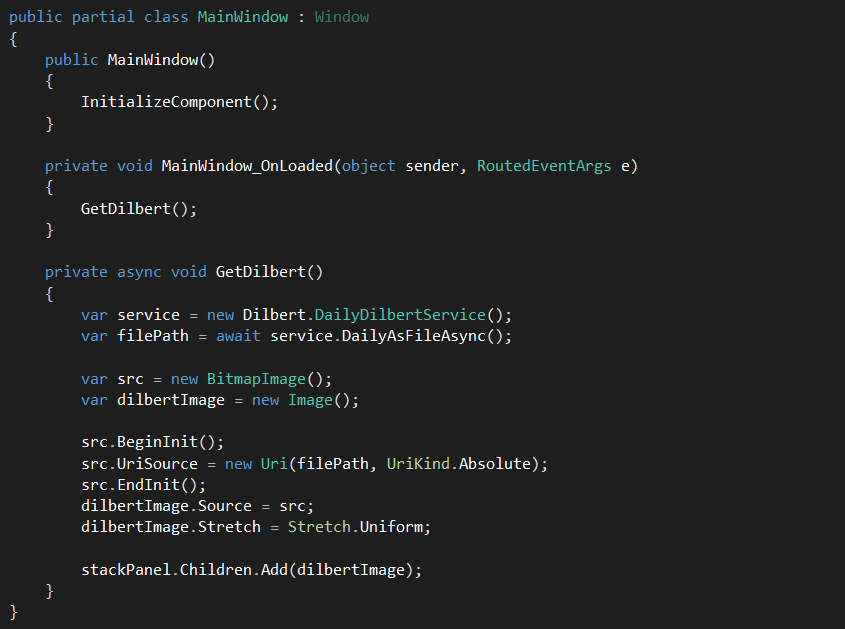
So you'r only a couple of clicks away from getting it working, a quick example WPF app is shown below:

 The test app is available for download.
First off a big shout to @hamish & @leeoades on this one - I'm just blogging about it. At work we have a test harness for launching the application in different environments, the test harness like the app is written in WPF. We got very bored of looking at the test harness UI and decided to make it a bit more interesting - we added the Daily Dilbert comic strip to the button to launch the app - a full on VB style button taking up most of the UI :)
This was originally done using code provided by Brian Ritchie, but since the image was removed from the daily Dilbert RSS a couple of months ago this no longer worked, fortunately a couple of weeks later a Yahoo pipes URL implementation appeared with the daily image.
We took this and used it inside a service to abstract away to complexity, here it is:
Loading ....
As you can see you can either get the image as either a file (*.jpg) or a .Net Stream. Also it makes use of TaskI've pushed the code to Git here & published a NuGet package here.
So you'r only a couple of clicks away from getting it working, a quick example WPF app is shown below:
Comments
Post a Comment