I was doing a code review with a client last week for a WPF app using MVVM and they asked 'How can I show a message from the ViewModel?'. What follows is how I would (and have) solved the problem in the past.
When I hear the words 'show a message...' I instantly think you mean show a transient modal message box that requires the user input before continuing 'with something else' - once the user has interacted with the message box it will disappear. The following solution only applies to this scenario.
The first solution is the easiest but is very wrong from a separation perspective. It violates the ideas behind the Model-View-Controller pattern because it places View concerns inside the ViewModel - the ViewModel now knows about the type of the View and specifically it knows how to show a message box window:
 The second approach addresses this concern by introducing the idea of messaging\events between the ViewModel and the View. In the example below I'm using the implementation MVVMLight framework Messenger instance to pass the message body from the ViewModel to the View. There is more of a ceremony to the code but we do get the separation between the View and the ViewModel.
The View for the second approach is shown below, as you can see we are accessing the ViewModel directly from the View via the DataContext property. I don't have any trouble with the View knowing about the ViewModel just the ViewModel knowing about the View. I could improve this separation by adding a dependency property to the View for the Messenger - then there wouldn't be an explicit use of the ViewModel in the code-behind of the View:
 The ViewModel now looks like this:
 Why is this still wrong?
We've managed to de-couple the ViewModel from the technology used to show a message box in the View, but we are still defining WHAT is going to be displayed by the View from the ViewModel - 'Need Help' & 'Do you want to do the work?'
This problem would become very apparent if this was a multilingual app, this method would require the ViewModel to manage the display resources (text) via a cultural specific resource (*.resx) class - this is not the correct place to do this, it should be done by the View.
The third solution is my preferred way, send a message with context to allow the View to show a message to the user, where the View decides upon what & how will be shown'
This give the following View, you can see now the View is deciding what is going to be shown:
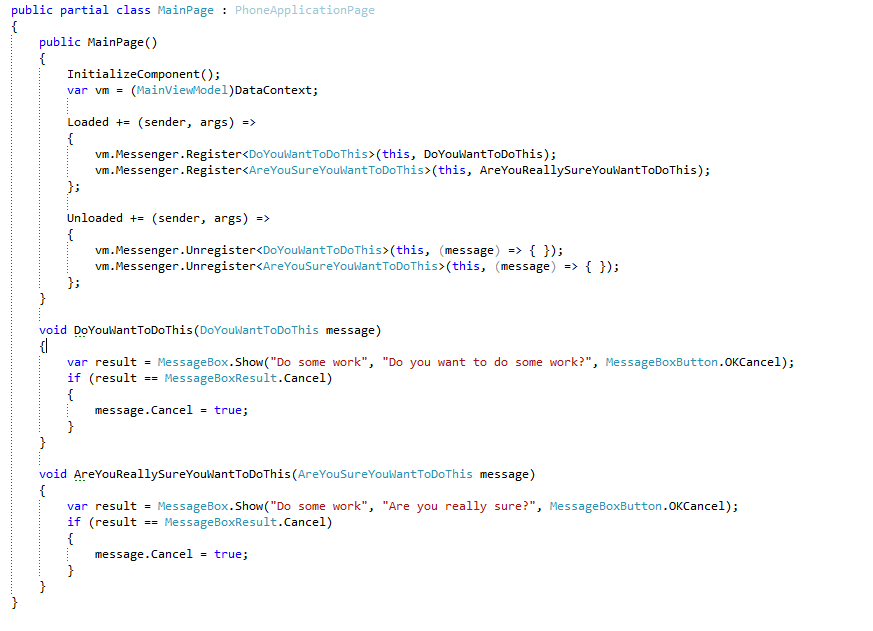 And the ViewModel now looks like this:

There is more of a ceremony to the code but I do believe this gives the separation required of the View & ViewModel.
When I hear the words 'show a message...' I instantly think you mean show a transient modal message box that requires the user input before continuing 'with something else' - once the user has interacted with the message box it will disappear. The following solution only applies to this scenario.
The first solution is the easiest but is very wrong from a separation perspective. It violates the ideas behind the Model-View-Controller pattern because it places View concerns inside the ViewModel - the ViewModel now knows about the type of the View and specifically it knows how to show a message box window:
The View for the second approach is shown below, as you can see we are accessing the ViewModel directly from the View via the DataContext property. I don't have any trouble with the View knowing about the ViewModel just the ViewModel knowing about the View. I could improve this separation by adding a dependency property to the View for the Messenger - then there wouldn't be an explicit use of the ViewModel in the code-behind of the View:
We've managed to de-couple the ViewModel from the technology used to show a message box in the View, but we are still defining WHAT is going to be displayed by the View from the ViewModel - 'Need Help' & 'Do you want to do the work?'
This problem would become very apparent if this was a multilingual app, this method would require the ViewModel to manage the display resources (text) via a cultural specific resource (*.resx) class - this is not the correct place to do this, it should be done by the View.
The third solution is my preferred way, send a message with context to allow the View to show a message to the user, where the View decides upon what & how will be shown'
This give the following View, you can see now the View is deciding what is going to be shown:
There is more of a ceremony to the code but I do believe this gives the separation required of the View & ViewModel.
Hi,
ReplyDeleteNice article! Thanks.
An even simpler way that preserves separation of concerns is to have the View deposit the address of one of its Message Display Methods into an appropriate Action property in the ViewModel. This works about the same as your last example, but without all the ceremony of messages. Long live the Action!
George Stevens
nice idea, think I'll give that a try...
DeleteI just published an article in my blog about using the Action like that. Its at http://dotnetsilverlightprism.wordpress.com/
DeleteI recently evolved from using events/delegates in my VM -> V communication, to using Actions.
DeleteI pass the action in to the VM, store it in a member var until some asynch operation returns. Then I schedule the action on the UI thread, and set it to null in the VM. It works wonders, and produces awesome flow of code, very much like the async await pattern of Windows 8.
Have you got a sample of this code anywhere? What is Imessenger implemented?
Delete