Mike Talbot's release a new version of SilverlightSerializer - keep up the great work!
Mike's blog can be found here with a list of the improvements for v2.
Obviously a performance improvement is always welcomed especially on a mobile device, but for me the biggest change is the friendly exception message support he's added. Several people using the WP7Contrib had said it was difficult to debug serialisation issues when using the Isolated Cache Provider because when it threw an exception invariably it would be the 'MissingMethodException'. At best this was a good pointer to problems with serialisation at worst it gave no really indication of where to look.
So the previous version (v1) gave the following output for the Cache Provider demo in the WP7Contrib Spikes directory, when the Isolated Cache Provider is attempting to serialize the cache contents (to isolated storage on a background thread) it's throwing the 'MissingMethodException' exception. This is because I've not added the WP7Contrib Serialization Helper assembly to the collection of external assemblies registered with the SilverlightSerializer.

So after compiling the new version of SilverlightSerializer for Windows Phone (I had do this manually after getting the code from GitHub) we get the following output.

Notice the exception details, it details the type failing serialisation - 'System.Uri'. It even goes as far to state the reason - the type does not have a parameterless constructor.
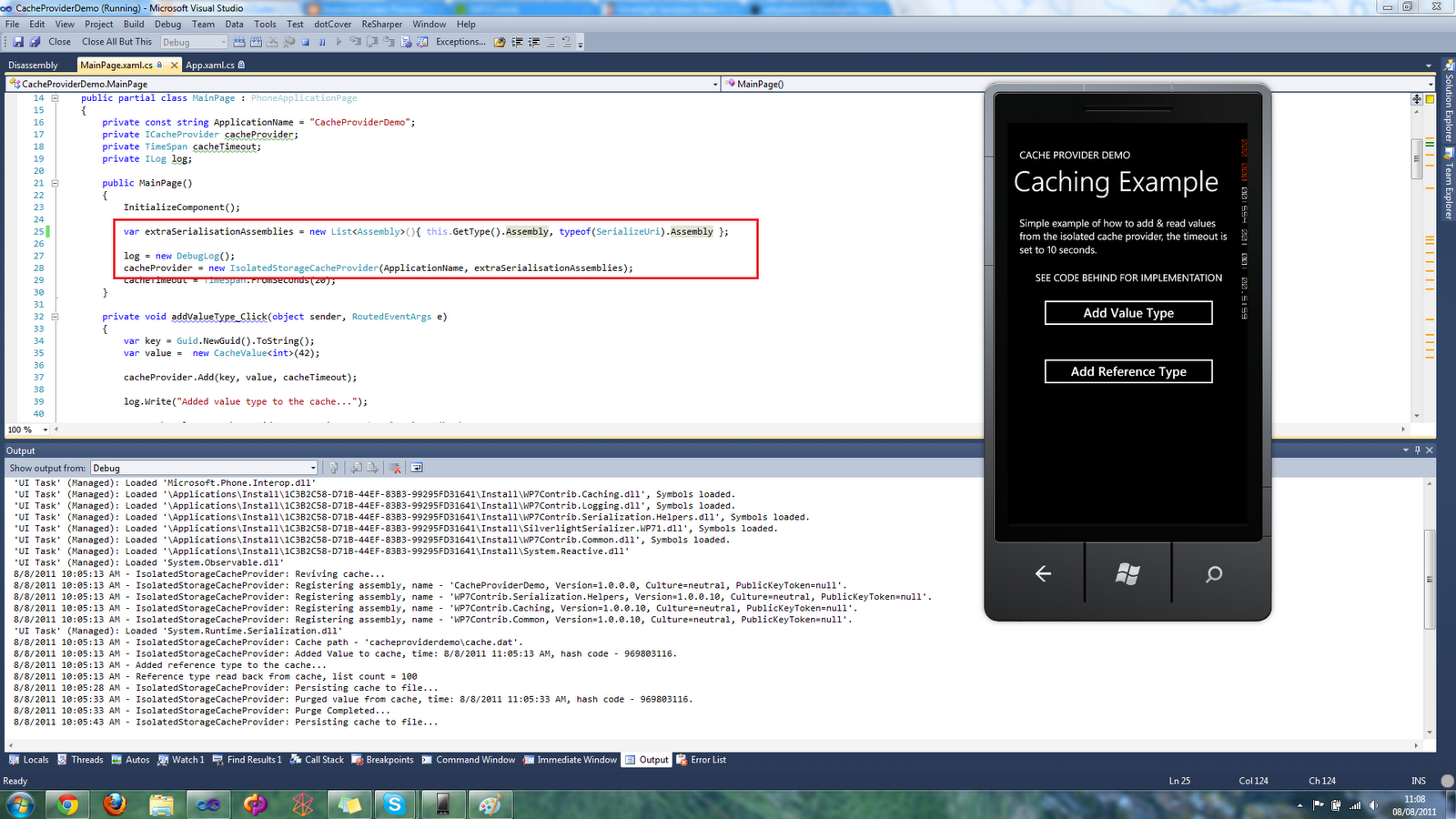
So to get this working as stated above we add the WP7Contrib Serialization Helper assembly to the collection of external assemblies registered with the SilverlightSerializer via the Isolated Cache Provider, see below:
That pretty much covers it.
I've got a blog post coming about the supported I've added to the Cache Provider Interface for checking type are serializable via a method called 'IsCacheable' this will allow you to check types are suitable for caching when writing unit tests.
Mike's blog can be found here with a list of the improvements for v2.
Obviously a performance improvement is always welcomed especially on a mobile device, but for me the biggest change is the friendly exception message support he's added. Several people using the WP7Contrib had said it was difficult to debug serialisation issues when using the Isolated Cache Provider because when it threw an exception invariably it would be the 'MissingMethodException'. At best this was a good pointer to problems with serialisation at worst it gave no really indication of where to look.
So the previous version (v1) gave the following output for the Cache Provider demo in the WP7Contrib Spikes directory, when the Isolated Cache Provider is attempting to serialize the cache contents (to isolated storage on a background thread) it's throwing the 'MissingMethodException' exception. This is because I've not added the WP7Contrib Serialization Helper assembly to the collection of external assemblies registered with the SilverlightSerializer.
So after compiling the new version of SilverlightSerializer for Windows Phone (I had do this manually after getting the code from GitHub) we get the following output.
Notice the exception details, it details the type failing serialisation - 'System.Uri'. It even goes as far to state the reason - the type does not have a parameterless constructor.
So to get this working as stated above we add the WP7Contrib Serialization Helper assembly to the collection of external assemblies registered with the SilverlightSerializer via the Isolated Cache Provider, see below:
That pretty much covers it.
I've got a blog post coming about the supported I've added to the Cache Provider Interface for checking type are serializable via a method called 'IsCacheable
Comments
Post a Comment